
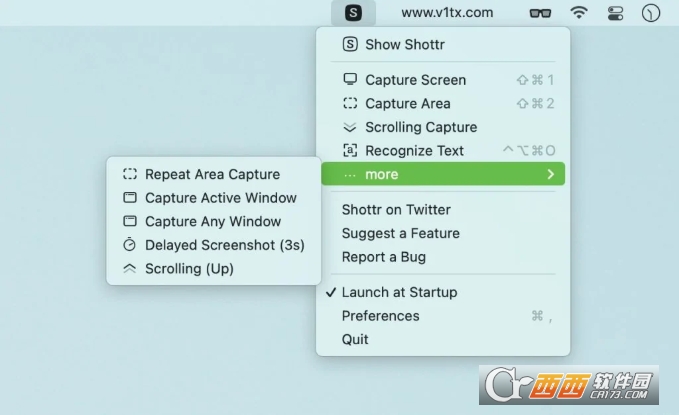
Shottr免费截图工具,Shottr是一款Mac专属的免费截图工具,功能十分齐全,涵盖了滚动截图,OCR文字识别,智能图片编辑删除等工具,基本满足用户的截图P图需求,使用方便。Shottr工具在Mac商店免费获取,需要的朋友们可以下载使用。

是一款新鲜的 macOS 免费截图工具,它可以滚动截屏、在截图上直接标记、模糊,支持中文 OCR,可定制快捷键,最大特色是缩放,以及屏幕标尺功能,可显示截图中不同位置的距离,并标记在截图上。只有 1.2MB 大小,原生支持 M1 芯片。
滚动截屏
擦除物体(截图后选中区域 > delete),会自动填充背景
标记(箭头、文字、方框等)
马赛克
缩放(最大 6400%,⌘2 恢复)
屏幕标尺(方向键出现标尺,鼠标点击即可将标尺留在截图上)
智能选择物体(按住 ⌘ 自动选择)
OCR 文字识别(截图后 OCR 快捷键为选中后 ⌘O)
背景(壁纸、透明、纯色、无背景)
取色(快捷键 Tab 复制颜色)
Shottr 的另外一个特色就是快,无论是截图速度、还是操作方式,都非常快。以及在配合快捷键的情况下,能够非常高效率的截图。对于每天截图的青小蛙来说,真是快。
⌘ 2 可以快速放大所选区域。
Q – 在选区的左上角进行缩放。
W – 在选取的右下角进行缩放。
CMD + 1 – 缩放至适合。
CMD + 0 – 缩放到100%。
CMD + + / – 放大/缩小。
快速剪裁:选中区域,按下 ENTER 回车。
New Features
Ability to change object styling (color, thickness, line style, pixelation level, etc)
Setting to change behavior of the Escape button when nothing is selected (options to Copy image and/or Save image)
Setting to open Shottr window bigger by default. When selected, the app starts at 80% zoom for the fullscreen screenshot, and area screenshots will open at 100% zoom more often
Setting to turn on/off telemetry collection. Please consider leaving this checkbox on, at least for a while, so that I can verify the app runs smoothly and no exceptions are thrown across variety of devices and OS versions
Ability to open a PNG or Jpeg file in Shottr via the “Open With” context menu. The app needs to be copied to the Application folder for that feature to work. If you save the opened file, it will override the original file
You can also open the image file through the “File” → “Open File” menu item
QR Reader: Text Recognition now detects and decodes QR codes
Guides: hold Opt+S or Opt+D to show a vertical or horizontal guide, click to imprint it on the image
Cmd+C / Cmd+V now works for the annotation objects
Chinese language is supported in Text Recognition. You need to select Chinese as your primary language in the Preferences (Advanced tab)
Added Repeat Area Screenshot – it will retake screenshot of the previously selected area
Added Delayed Screenshot (3s delay)
Improvements
Arrow tool improvements. Longer arrows are now slimmer, more styles are available, including curved arrows and super-slim arrows.
Hold space while drawing an object to move it around.
If you start taking an area capture and hit Esc in the process, the window won’t pop up.
Pixelation algo produces a more uniform pattern, works a tad faster too.
Pixelation on small areas scrambles pixels for better protection.
Improved Ruler rendering on non-retina displays (crisper look).
Window screenshot with Wallpaper or Solid background now have proportionate top and bottom paddings.
Addressed an issue when the cursor is occasionally imprinted in the scrolling screenshot.
Cosmetic improvements to the object handling knobs and helper popovers.
Added new color format: HEX without the sharp (#) character.
Improved stability when doing Cmd+Click raster selection on area screenshots.
Window Screenshot better process edge case scenarios and allows you to select window is Shottr can’t identify which window is currently active.
开发者其他应用

Sunny截图
 Mac图形图像
18.4M
v1.6.2 Mac版
Mac图形图像
18.4M
v1.6.2 Mac版
Lorien无限制白板
Mac图形图像
53.8M
v0.6.0 Mac版
图几(截图标注美化)
Mac图形图像
169.9M
v0.9.2 官方版
饼图大师(饼图制作)
Mac图形图像
13M
v1.1 官方版
qView图片浏览
Mac图形图像
33.5M
v6.1 Mac版
Aseprite像素画绘制工具
Mac图形图像
15.4M
v1.6.0 Mac版
一键AI绘画Mac版
Mac图形图像
252.8M
V2.0.0.1苹果电脑版
迅捷屏幕录像工具Mac版
Mac图形图像
98.5M
V1.2.3苹果电脑版
迅捷抠图Mac版官方客户端
Mac图形图像
256.6M
V1.5.0苹果电脑版
图片编辑助手Mac版
Mac图形图像
181.7M
V5.2.0苹果电脑版



支持( 0 ) 盖楼(回复)