

拆分EXCEL文件.exe是一款根据某一列,拆分成几个不同的EXCEL文件,用户这进行使用Excel文档的时候,经常的会需要使用到数据的拆分操作,可是如果没有好的工具帮助用户的话,就会非常的浪费时间和精力,还有这样的烦恼。
将EXCEL文件拖至EXE文件上,根据提示操作。
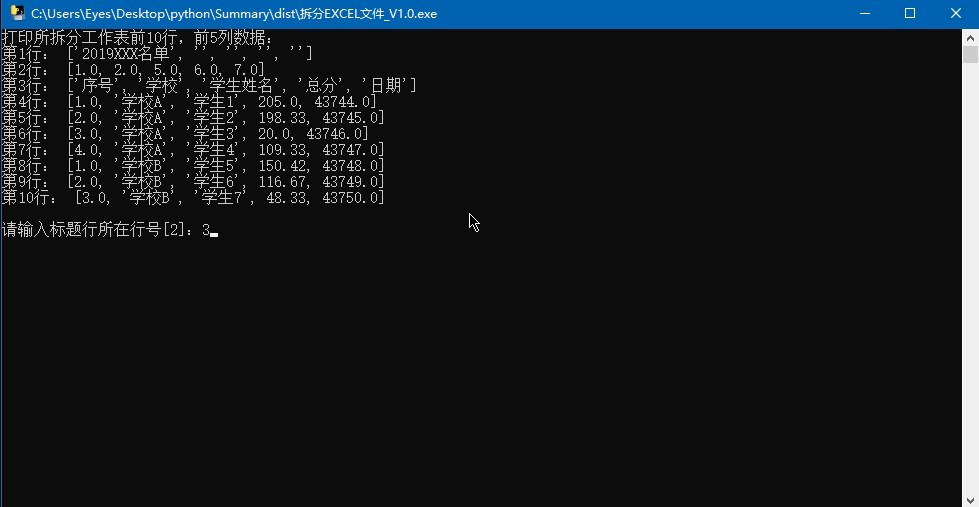
import openpyxl
from openpyxl.utils import get_column_letter
import xlrd
import sys, os, collections
from pprint import pprint
from copy import copy
class splitExcel(object):
def __init__(self, sourceFile, titleLine=None, splitColumn=None):
self.sourceFile = sourceFile
self.sourceWorkbook = openpyxl.load_workbook(sourceFile)
self.targetWorkbook = openpyxl.Workbook()
self.targetWorkbook.remove(self.targetWorkbook.active)
# 源工作表(object对象)
self.sourceWorksheet = None
# 最大行数
self.sourceWorkbookMaxRow = None
# 最大列数
self.sourceWorkbookMaxColumn = None
# 源工作表索引号
self.sourceWorksheetIndex = None
# 标题所在行号,用户输入时索引从1开始,内部处理时请留意索引数
# if titleLine == None:
# titleLine = int(input('请输入标题所在行[2]: ').strip())
self.titleLine = titleLine
# 根据哪个列进行拆分,用户输入时索引从1开始,内部处理时请留意索引数
self.splitColumn = splitColumn
# 源工作薄当前行号
self.sbCurrectLine = None
# 目标工作薄各表当前数据行号
self.tbCurrectLines = {}
# 表头文字
self.header = []
# 各表数据
self.data = collections.OrderedDict()
# 保存列宽
self.columnsWidth = collections.OrderedDict()
# 格式
self.formats = {}
def readData(self):
wb = xlrd.open_workbook(self.sourceFile)
ws = wb.sheet_by_index(self.sourceWorksheetIndex)
for x in range(ws.nrows):
if x < self.titleLine:
# 表头
self.header.append(ws.row_values(x))
else:
v = ws.cell(x, self.splitColumn - 1).value
sheetName = self.clearSheetName(v)
# 将表名加入data字典
if sheetName not in self.data.keys():
self.data[sheetName] = []
# 添加数据
self.data[sheetName].append(ws.row_values(x))
def selectSplitSheet(self):
if len(self.sourceWorkbook.sheetnames) == 1:
self.sourceWorksheet = self.sourceWorkbook.active
self.sourceWorksheetIndex = 0
else:
_n_ = 0
print('在工作薄中找到以下工作表:')
for SheetName in self.sourceWorkbook.sheetnames:
print(_n_, SheetName)
_n_ += 1
n = 0
_input = input('请输入要拆分表的序号[0]: ').strip()
if _input != '':
n = int(_input)
self.sourceWorksheet = self.sourceWorkbook.worksheets[n]
self.sourceWorksheetIndex = n
def selectSplitColumn(self):
wb = xlrd.open_workbook(self.sourceFile)
ws = wb.sheet_by_index(self.sourceWorksheetIndex)
# 保存一下最大行数、列数,以供其它(属性)地方使用
self.sourceWorkbookMaxRow = ws.nrows
self.sourceWorkbookMaxColumn = ws.ncols
print('\n在工作表的标题行(第 %s 行)找到以下列: ' % self.titleLine)
for y in range(1, ws.ncols + 1):
print(y, ws.cell(self.titleLine - 1, y - 1).value)
columnNum = input('请输入拆分列号[2]: ').strip()
if columnNum == '':
columnNum = 2
else:
columnNum = int(columnNum)
self.splitColumn = columnNum
def readCellsStyle(self):
ws = self.sourceWorksheet
maxColumn = self.sourceWorkbookMaxColumn
styles = [[None] * (maxColumn + 11) for i in range(self.titleLine + 11)]
fonts = [[None] * (maxColumn + 11) for i in range(self.titleLine + 11)]
borders = [[None] * (maxColumn + 11) for i in range(self.titleLine + 11)]
fills = [[None] * (maxColumn + 11) for i in range(self.titleLine + 11)]
alignments = [[None] * (maxColumn + 11) for i in range(self.titleLine + 11)]
number_formats = [[None] * (maxColumn + 11) for i in range(self.titleLine + 11)]
protections = [[None] * (maxColumn + 11) for i in range(self.titleLine + 11)]
heights = [None] * (self.titleLine + 11)
widths = [None] * (maxColumn + 11)
# isDates = [None] * (maxColumn + 11)
for x in range(1, self.titleLine + 2):
heights[x] = ws.row_dimensions[x].height
# print(x,'height',heights[x])
# for y in range(1, ws.max_column + 1):
for y in range(1, maxColumn + 1):
styles[x][y] = copy(ws.cell(x, y).style.replace('常规', 'Normal'))
fonts[x][y] = copy(ws.cell(x, y).font)
borders[x][y] = copy(ws.cell(x, y).border)
fills[x][y] = copy(ws.cell(x, y).fill)
alignments[x][y] = copy(ws.cell(x, y).alignment)
number_formats[x][y] = copy(ws.cell(x, y).number_format)
protections[x][y] = copy(ws.cell(x, y).protection)
if y not in widths:
widths[y] = ws.column_dimensions[get_column_letter(y)].width
# print(y, get_column_letter(y), ws.column_dimensions[get_column_letter(y)].width)
# if y not in isDates:
# isDates[y] = ws.cell(x, y).is_date
self.formats['heights'] = heights
self.formats['styles'] = styles
self.formats['fonts'] = fonts
self.formats['borders'] = borders
self.formats['fills'] = fills
self.formats['alignments'] = alignments
self.formats['number_formats'] = number_formats
self.formats['protections'] = protections
self.formats['widths'] = widths
# self.formats['isDates'] = isDates
def writeFormatToNewWorkbook(self):
for sheetName in self.data.keys():
ws = self.targetWorkbook[sheetName]
# for x in range(1,self.titleLine+2):
for x in range(1, ws.max_row + 1):
# 表头
if x <= self.titleLine:
xx = x
# ws.row_dimensions[x].height = self.formats['heights'][x]
else:
# 表数据
xx = self.titleLine + 1
height = self.formats['heights'][xx]
if not height == None and height > 0:
ws.row_dimensions[x].height = self.formats['heights'][xx]
for y in range(1, ws.max_column + 1):
# 表头
if x <= self.titleLine:
# 路过空白单元格
# if ws.cell(x, y).value == '':
# continue
width = self.formats['widths'][y]
if not width == None and width > 0:
ws.column_dimensions[get_column_letter(y)].width = self.formats['widths'][y]
xx = x
else:
# 表数据
xx = self.titleLine + 1
ws.cell(x, y).style = self.formats['styles'][xx][y]
ws.cell(x, y).font = self.formats['fonts'][xx][y]
ws.cell(x, y).border = self.formats['borders'][xx][y]
ws.cell(x, y).fill = self.formats['fills'][xx][y]
ws.cell(x, y).alignment = self.formats['alignments'][xx][y]
ws.cell(x, y).number_format = self.formats['number_formats'][xx][y]
ws.cell(x, y).protection = self.formats['protections'][xx][y]
# if x>self.titleLine and self.formats['isDates'][y]:
# ws.cell(x, y).number_format = 'yyyy/mm/dd'
def writeDataToNewWorkbook(self):
for sheetName in self.data.keys():
ws = self.targetWorkbook.create_sheet(sheetName)
# 写入头文字
x = 0 # 行号
for row in self.header:
x += 1
y = 0 # 列号
for cellValue in row:
y += 1
if not cellValue == '':
ws.cell(x, y).value = cellValue
# 写入数据
for row in self.data[sheetName]:
ws.append(row)
def clearSheetName(self, name, replaceAs='-'):
invalidChars = r':\/?*[]:'
for c in invalidChars:
name = name.replace(c, replaceAs).strip()
return name
def selectTitleLine(self):
wb = xlrd.open_workbook(self.sourceFile)
ws = wb.sheet_by_index(self.sourceWorksheetIndex)
# 保存一下最大行数、列数,以供其它(属性)地方使用
self.sourceWorkbookMaxRow = ws.nrows
self.sourceWorkbookMaxColumn = ws.ncols
print('打印所拆分工作表前10行,前5列数据:')
maxY = ws.ncols
if ws.ncols > 5:
maxY = 5
for x in range(10):
tempList = []
for y in range(maxY):
tempList.append(ws.cell(x, y).value)
print('第%s行:' % (x + 1), tempList)
titleLine = 2
n = input('\n请输入标题行所在行号[2]:').strip()
if not n == '':
titleLine = int(n)
self.titleLine = titleLine
def make(self):
self.selectSplitSheet()
self.selectTitleLine()
self.selectSplitColumn()
print('开始读取数据...')
self.readData()
print('开始读取格式...')
self.readCellsStyle()
print('开始写入数据至分表...')
self.writeDataToNewWorkbook()
print('开始写入格式至分表...')
self.writeFormatToNewWorkbook()
def save(self, filename=None):
if filename == None:
splitPath = os.path.split(self.sourceFile)
filename = splitPath[0] + '/拆分_' + splitPath[1]
self.targetWorkbook.save(filename)
self.sourceWorkbook.close()
self.targetWorkbook.close()
return filename
class saveWorksheetToWorkbook(object):
def __init__(self, excelFile):
self.excelFile = excelFile
def saveTo(self, savePath=None, addNumToFilename=True):
if savePath == None:
splitPath = os.path.splitext(self.excelFile)
savePath = splitPath[0]
if not os.path.exists(savePath):
os.makedirs(savePath, exist_ok=True)
wb = openpyxl.load_workbook(self.excelFile)
sheetNames = wb.sheetnames
wb.close()
#
# _input=input('正在保存各表至独立工作薄,文件名前是否加序号?[Y] Y/N:').strip().lower()
# if _input=='n':
# addNumToFilename=False
n=0
for sheetName in sheetNames:
n+=1
print('保存', n, sheetName)
wb = openpyxl.load_workbook(self.excelFile)
for ws in wb.worksheets:
if not sheetName == ws.title:
wb.remove(ws)
xh=''
if addNumToFilename:
xh=str(n)
filename='%s/%s%s.xlsx' % (savePath, xh,sheetName)
wb.save(filename)
wb.close()
return savePath
if __name__ == '__main__':
file = r'C:\Users\Eyes\Desktop\汇总.xlsx'
file = sys.argv[1]
se = splitExcel(file)
# file = r'C:\Users\Eyes\Desktop\2019年积分排名-2019-07-09.xlsx'
# se = splitExcel(file, 1, 3)
se.make()
f = se.save()
print('拆分汇总文件:', f)
# f=r'C:\Users\Eyes\Desktop\汇总.拆分.xlsx'
saveTo = saveWorksheetToWorkbook(f)
p = saveTo.saveTo()
print('拆分表保存文件夹:', p)
input('\n完成,按回车键退出。')
开发者其他应用

讯飞文档app官方版25.2M13484人在玩讯飞文档app官方下载2022最新版是科大讯飞公司打造的一款在线协作文档软件,这款讯飞文档app跟腾讯文档的功能有点类似,都可以让团队在线上进行协作。
下载腾讯会议官方版app90.7M14041人在玩腾讯会议官方最新版app专门为需要在线线上会员的小伙伴准备的非常实用的app工具,支持电脑移动端同步,给需要开会你带来最棒的办公体验,相信不少的小伙伴都会需要
下载2022货车帮货主版app140.8M17149人在玩货车帮货主是成都运力科技有限公司旗下物流智能分配货运平台,覆盖全国360多个城市的物流货运平台,是一款为全国各地货主提供经验丰富、安全可靠的货车司机的找车发货软件。
下载招才猫直聘官方app67.6M7290人在玩招才猫直聘是由58同城推出的商业直聘专用APP,全国1850万商家都在使用招才猫直聘!海量各个领域人才等你来发现、挖掘,你可以在58招财猫官网上看到人家的详细资料。
下载口碑外卖商家版75.1M87人在玩口碑外卖掌柜是淘宝为入驻口碑外卖的商家提供的一款手机客户端,商家们可以通过口碑掌柜客户端查看店铺的最新订单并对自己的店铺进行管理,有新的订单软件会以语音的形式提醒你接单
下载易企秀设计app43.7M7599人在玩易企秀设计app是一款免费的移动场景自营销管家工具,这款易企秀设计app可以帮你免费制作各类手机h5营销类应用,另外这款易企秀设计app还可以帮你查看手机网页的访问量。
下载美团外卖商家版117.2M19211人在玩美团外卖商家版是美团外卖专门为商家们打造的一款手机客户端。如果你是入驻美团外卖的商家,那么你可以在这里更好地管理你的商铺,美团外卖商家版app轻松地查看用户的下单信息。
下载易企秀设计44.8M170人在玩易企秀是一款专门为企业打造的微信辅助类应用,你可以通过易企秀设定微信页面的场景、颜色、文字版式等等,还可以通过它查看网页的访问量以及潜在客户报名等等消息。
下载boss直聘招聘版手机版123.8M5450人在玩boss直聘招聘版手机版是一款用相亲交友的方式做招聘,让老板和求职者在平台上直接沟通的社交软件。Boss直聘分为面向求职者的”牛人版“和面向老板的”Boss版“。
下载饿了么商家版最新版本134.7M8390人在玩饿了么商家手机客户端是饿了么外卖网为入驻商家提供的一款手机客户端软件,这款应用可以帮助商家使用手机快速接单,部分应用要求用户时时打开应用界面才能接收订单消息推送。
下载