
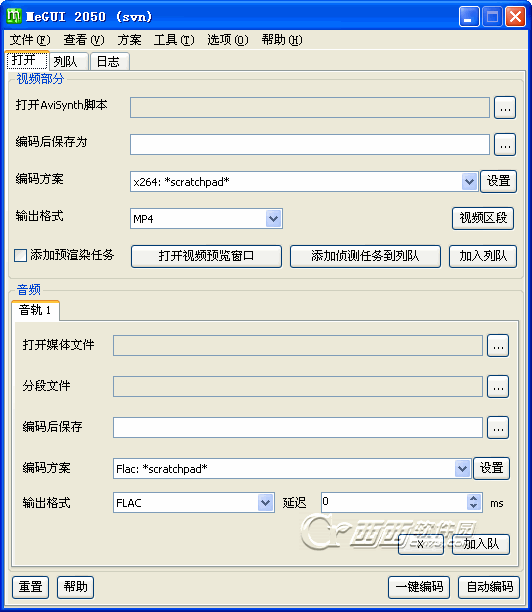
MeGUI中文版是全球知名的开源压制x264视频编码器,具有体积小,绿色版全免费的优势。功能也丝毫不逊色于商业软件。
MeGUI中文版输出的视频编码是x264、Xvid等当今流行的编码格式,音频编码的选择更多,输出的文件类型为MKV、MP4、RAW扩展名的视频。
2011-10-27:
-汉化第二版,在2050汉化第一版的基础上进行汉化编译
-对部分未汉化窗口进行汉化
-修正一处由汉化所产生可导致程序崩溃的BUG (感谢coxph的反馈)
2011-10-26:
-汉化第一版,基于官方 MeGUI 2050(svn) x86 上进行汉化编译
Changelog 2028 --> 2050
Main changes:
[x264] blu-ray device: added 1440x1080 as supported resolution
[OneClick] added option to mux the audio source file only if the codec is the same as requested
Other changes:
[Audio Encoder] added 24 <--> 25 conversions
[AviSynth] open script handling improved
[Chapter Creator] fixed language tag creation
[FFMSIndexer] added option to select the number of decoding threads. default and recommended value is 1
changed LoadCPlugin to LoadPlugin for the x64 plugin (requires ffms r507+)
[Flac] enhanced output handling if file already exists
[Lame] fixed always applying bitrate 128 in ABR mode
[MainForm] fixed spelling. Bug #3390630
[Mediainfo] mediainfo details are written into the log for most files/jobs
[OneClick] enhanced error handling
[OneClick] fixed editing of mkv mux jobs
[OneClick] preserve audio track order during processing
[Source Detector] enhanced error handling
[Update] added check so that files can only be installed using the correct MeGUI build
[Video Player] fixed video preview window for some avs scripts (e.g. using ImageSource)
[x264] added --subme 11 (requires x264 revision 2037+)
[x264] blu-ray device: enhanced --sar detection
[x264] fixed maximum --rc-lookahead value. a value > 250 was possible in rare situations. Bug #3383262
[x264] --keyint will not be applied twice if specified in the custom command line
[x264] cosmetics
开发者其他应用

番茄畅听app安卓版40.5M46064人在玩番茄畅听app安卓版是字节跳动最新发布的一款听书app,目前ios和安卓平台已发布最新版本,使用番茄畅听app可以在手机上用耳朵“看书”,方便又健康,还有专属的声音
下载抖音极速版79.7M184140人在玩抖音极速版app下载安装,抖音极速版在今天发布了,这也是官方发布的第一个极速版,登录抖音极速版,看视频赚红包,看的越多赚的越多。邀请好友也能赚红包
下载格式工厂手机版(Format Factory)14.5M694人在玩格式工厂手机版是一款免费的手机视频转换器,这款软件可以让你在手机上转换视频文件格式,格式工厂手机版支持市面上大部分的视频文件格式,包括MP4,FLV,AVI,MKV,MP3,FLAC,WMA,OGG等。格式工厂手机版还支持设置输出视频的尺寸、码率、长宽比等参数
下载小米直播app72.9M344667人在玩小米直播app免费下载,小米直播手机客户端正式发布,这也是小米官方发布的一款手机直播软件,主打美颜直播,其实小米直播就是之前的黑金直播升级改版了。
下载映客直播164.2M310人在玩映客直播app是一款美女直播平台,各类帅男美女在此竞相争艳,来自全球的用户都可以欣赏直播节目哟,映客直播完全免费,全天二十四小时从不间断,让你与偶像面对面接触。
下载喜马拉雅fm最新版110.3M1011人在玩喜马拉雅fmapp是中国最大音频分享平台,数亿人都在用的手机随身听!听有声小说、相声评书、新闻、音乐、脱口秀、段子笑话、英语、儿歌儿童故事,就用喜马拉雅!
下载糖豆视频54.1M7156人在玩糖豆视频app有最专业的广场舞演示视频,通过详细的视频与图文资料,糖豆视频app让你把握广场舞的每一个细节动作,学会更多的广场舞跳法,让你的生活更加丰富多彩
下载喜马拉雅听书免费版109.2M53369人在玩喜马拉雅听书免费版官方下载,喜马拉雅听书免费版是一款音频书籍在线播放的软件APP,喜马拉雅听书软件主要是提供各种音频书籍给用户收听,涵盖面广泛包括相声小品综艺节目。
下载哔哩哔哩app99.2M78908人在玩哔哩哔哩app下载安装,哔哩哔哩app是一款Android手机上的b站视频客户端,哔哩哔哩app主要是看到知名的弹幕acg主题视频站Bilibili的各种趣怪恶搞内容。
下载斗鱼安卓版107.1M87815人在玩斗鱼app下载安卓下载,斗鱼直播平台相信对于很对电竞玩家来说很熟悉了,现在斗鱼tv强势推出安卓手机客户端,斗鱼tv安卓版让你能够在手机上欣赏精彩游戏视频直播。
下载
支持( 0 ) 盖楼(回复)